
If your Shopify store serves customers in the European Union, you may need to control when wishlist-related cookies, local storage, and customer data can be used.
Wishlist Guru’s EU Privacy / Consent Compliance setting helps merchants restrict Wishlist Guru functionality until the customer has provided the required consent through the store’s privacy or cookie banner.
When enabled, Wishlist Guru checks the consent status provided by Shopify before using cookies, local storage, or storing the customer’s email address.
Note: This feature is available on the Premium plan.
How Does Wishlist Guru Handle EU Privacy? #
When EU Privacy / Consent Compliance is enabled, Wishlist Guru works with your Shopify store’s customer privacy consent system.
The behavior depends on whether your Shopify store has a customer privacy/cookie banner enabled.
| Wishlist Guru EU Privacy | Store Cookie Banner | Wishlist Guru Behavior |
|---|---|---|
| Disabled | Enabled or disabled | Wishlist Guru works normally |
| Enabled | Disabled | Wishlist Guru works normally |
| Enabled | Enabled + consent not given | Wishlist Guru functionality is restricted |
| Enabled | Enabled + required consent given | Wishlist Guru works normally |
This allows merchants to use Wishlist Guru while giving customers control over whether the required cookies and storage technologies can be used.
Before You Start #
Before enabling the setting in Wishlist Guru, make sure your Shopify store’s customer privacy settings are configured.
You can check this from your Shopify admin under: Settings → Customer Privacy → Cookie banner
If Shopify’s cookie banner is not enabled, Wishlist Guru will continue to work normally even when the EU Privacy setting is enabled.
Important: Wishlist Guru does not replace Shopify’s customer privacy settings or your store’s privacy policy. Make sure your store’s privacy and consent configuration is appropriate for your target markets.
How to Enable EU Privacy in Wishlist Guru #
Step 1: Open Wishlist Guru #
From your Shopify admin, go to: Apps → Wishlist Guru
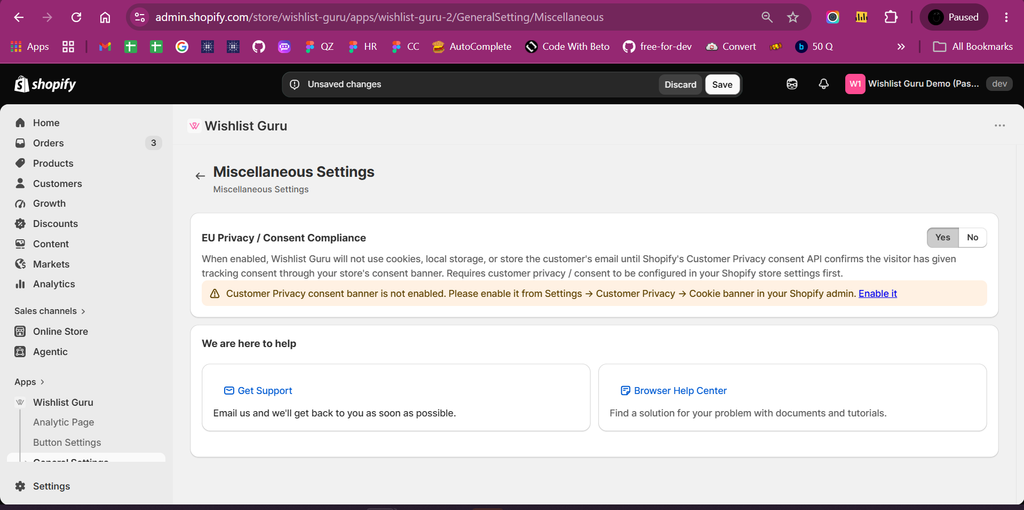
Then open: General Settings → Miscellaneous Settings
Step 2: Enable EU Privacy / Consent Compliance #
Find the EU Privacy / Consent Compliance setting. Select Yes to enable the feature.
When enabled, Wishlist Guru will wait for the appropriate customer consent before using cookies or local storage for its functionality.
The app checks whether a privacy/cookie banner is enabled on the store.
Step 3: Check Your Shopify Cookie Banner #
After enabling the setting, Wishlist Guru checks whether your Shopify store has a customer privacy/cookie banner configured.
If the banner is not enabled, you will see a notice in Wishlist Guru: Customer Privacy consent banner is not enabled.
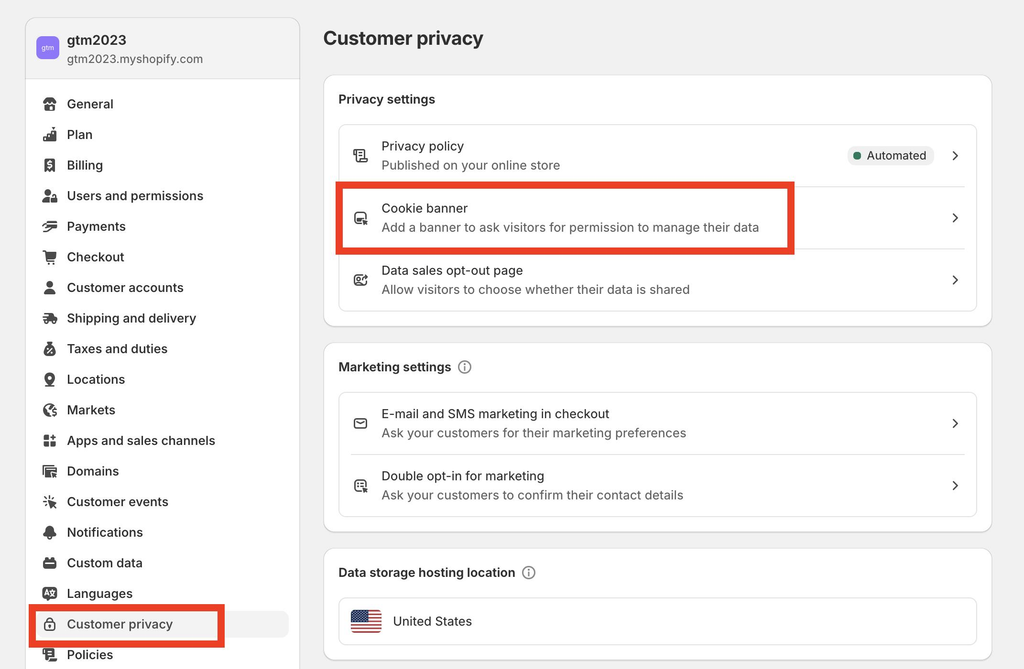
You can use the Enable it link to access the relevant Shopify customer privacy settings.
What Happens When the Cookie Banner Is Enabled? #
If both of the following are enabled:
- EU Privacy / Consent Compliance in Wishlist Guru
- Customer Privacy / Cookie Banner in Shopify
Wishlist Guru will check the customer’s consent before using the required storage mechanisms.
If the customer has not provided the required consent #
Wishlist Guru will restrict its functionality and display a privacy message to the customer.
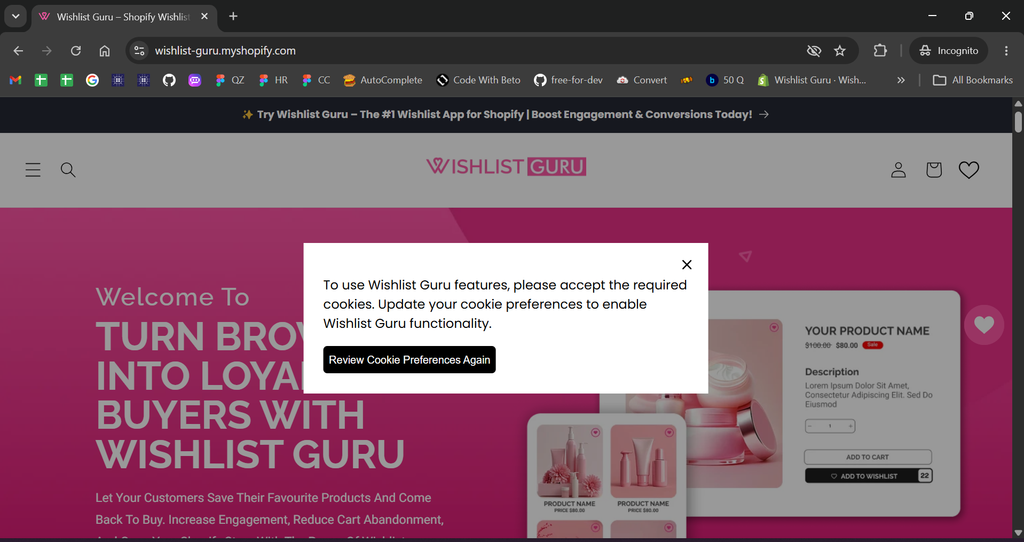
The customer can then select Review Cookie Preferences Again to review their cookie preferences.
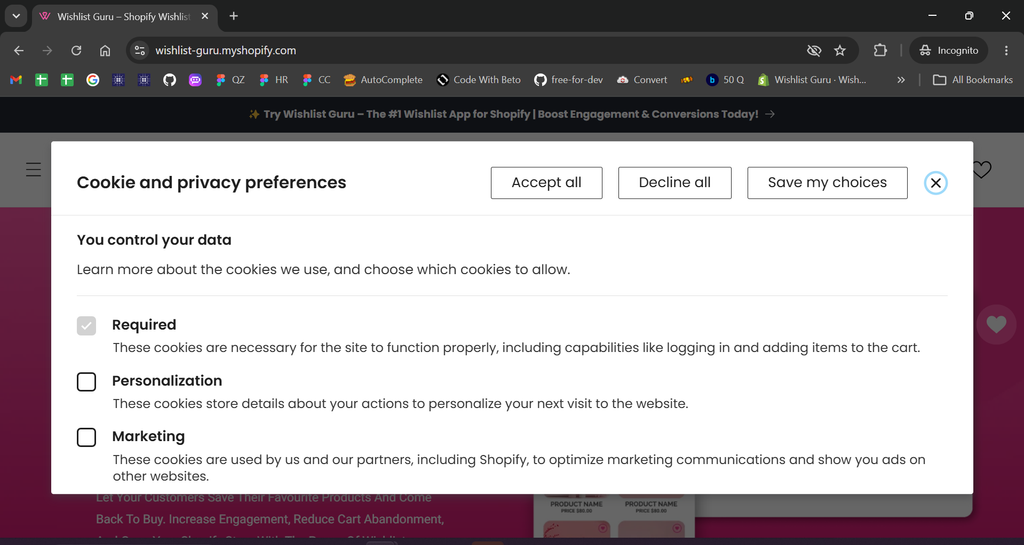
If the customer accepts the required consent #
Once the required consent is provided, Wishlist Guru can work normally and store the data required for its functionality.
The customer can then use features such as adding products to their wishlist.
What Happens If Your Store Does Not Have a Cookie Banner? #
If EU Privacy / Consent Compliance is enabled in Wishlist Guru but your Shopify store does not have a customer privacy banner enabled, Wishlist Guru will continue to work normally.
This means the Wishlist Guru restriction is dependent on the store’s customer privacy consent system being available.
However, merchants should still configure their Shopify customer privacy settings according to the requirements applicable to their store and customers.
Customize the Privacy Restriction Message #
Wishlist Guru also lets you customize the message shown when a customer cannot use Wishlist Guru because the required consent has not been provided.
Go to: Wishlist Guru → General Settings → Language Settings
Find the relevant EU Privacy / consent message and update the text according to your store’s requirements.
For example, you can use: Default-style message:
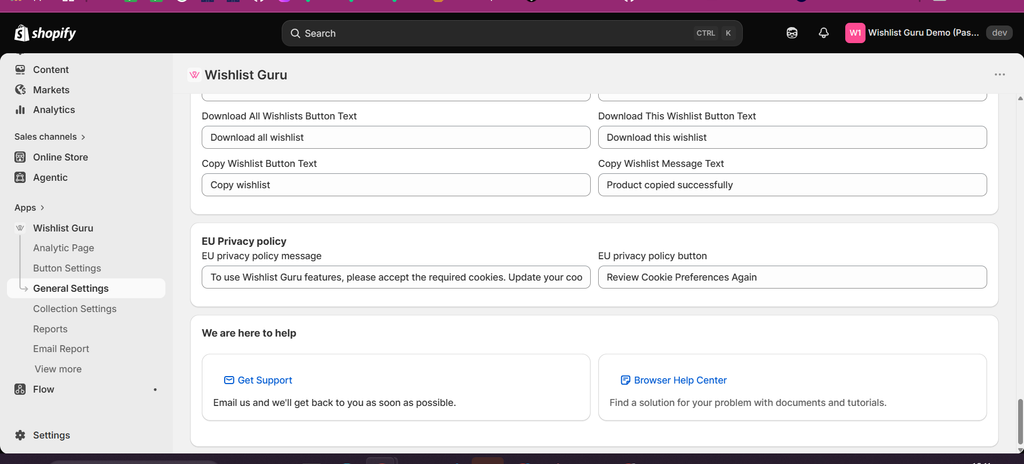
You can customize this message to better match your store’s language and tone.
How Customer Data Is Handled #
When EU Privacy / Consent Compliance is enabled, Wishlist Guru is designed to avoid using cookies and local storage before the required consent is available.
Customer email addresses are also encrypted before being stored.
This helps Wishlist Guru limit data storage and processing until the required consent status has been received.
Frequently Asked Questions #
#
EU Privacy / Consent Compliance is a Premium feature that allows Wishlist Guru to check the customer’s privacy consent before using cookies, local storage, and storing customer email data required for wishlist functionality.
#
No. The feature is available on the Premium plan.
#
When EU Privacy / Consent Compliance is enabled and the store’s customer privacy consent system is active, Wishlist Guru does not use the relevant cookies or local storage before the required consent is available.
#
If the Wishlist Guru EU Privacy setting is enabled but your Shopify store does not have a customer privacy/cookie banner configured, Wishlist Guru will continue to work normally.
#
Wishlist Guru functionality that requires the relevant consent will be restricted, and the customer will see the configured privacy message with an option to review their cookie preferences.
#
Yes. The privacy restriction message and related button text can be customized from Wishlist Guru → General Settings → Language Settings.


