
The Klaviyo Setup for Low in Stock Alerts in Wishlist Guru lets you automate timely notifications to customers when their wishlisted items are running low in inventory. This feature creates a sense of urgency and encourages quicker purchases, helping you reduce stockouts and boost conversions. By enabling the Low in Stock setting in the Wishlist Guru dashboard and building a custom flow in Klaviyo, you can ensure customers stay informed. Remember, Klaviyo won’t show the flow trigger until it records the first event—so be sure to test it by adding a product to your wishlist to activate the flow.
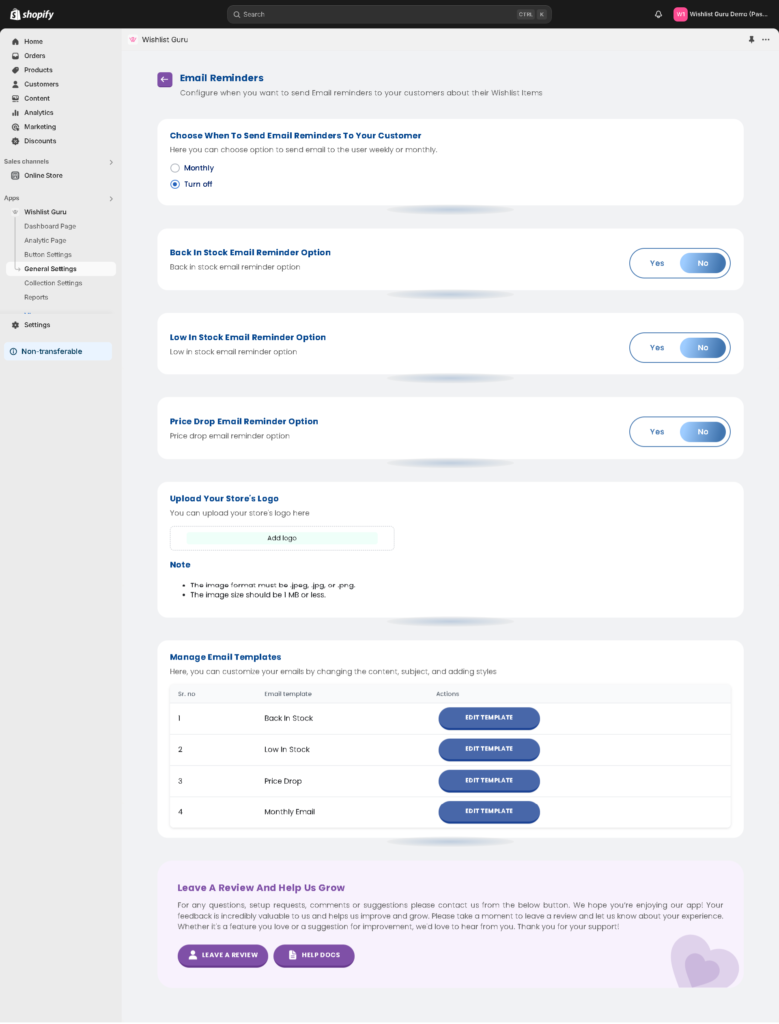
How to Configure Low in Stock in Wishlist Guru: #
- 1. Go to General Settings
- 2. Click on email reminder settings and
- 3. Enable the low in stock button as shown in the screenshot.
- By default its “no”
- to enable it, click “yes”
How to set up the Email Flow in Klaviyo: #
If you integrate Klaviyo, then our monthly email limit will be revoked. We will pass all events and data to Klaviyo, and you will need to create and set up flows in Klaviyo. There is no restriction from our side on the email count if you use Klaviyo.
Pro Tip: If you are not seeing Wishlist Guru – Low in stock in your “your metrics” section this is because klaviyo will not display flow triggers until they have received at least one event.Do this by triggering the event yourself. Try logging in to your store again and add one product to your wishlist to record this event on Klaviyo . Then you can check that in “your metrics” section that event will be displayed or added after that.


