
The Klaviyo Setup for Back in Stock Alerts in Wishlist Guru enables you to create automated email flows that notify customers when products they’ve wishlisted are available again. This integration helps you re-engage interested shoppers and recover potential lost sales. By enabling the Back in Stock option within the app settings and connecting it to Klaviyo’s flow builder, you can design targeted campaigns with ease. Just make sure to trigger the event once manually—since Klaviyo only shows flow triggers after receiving an initial event—to get your automation up and running effectively.
How to Configure Back in Stock in Wishlist Guru: #
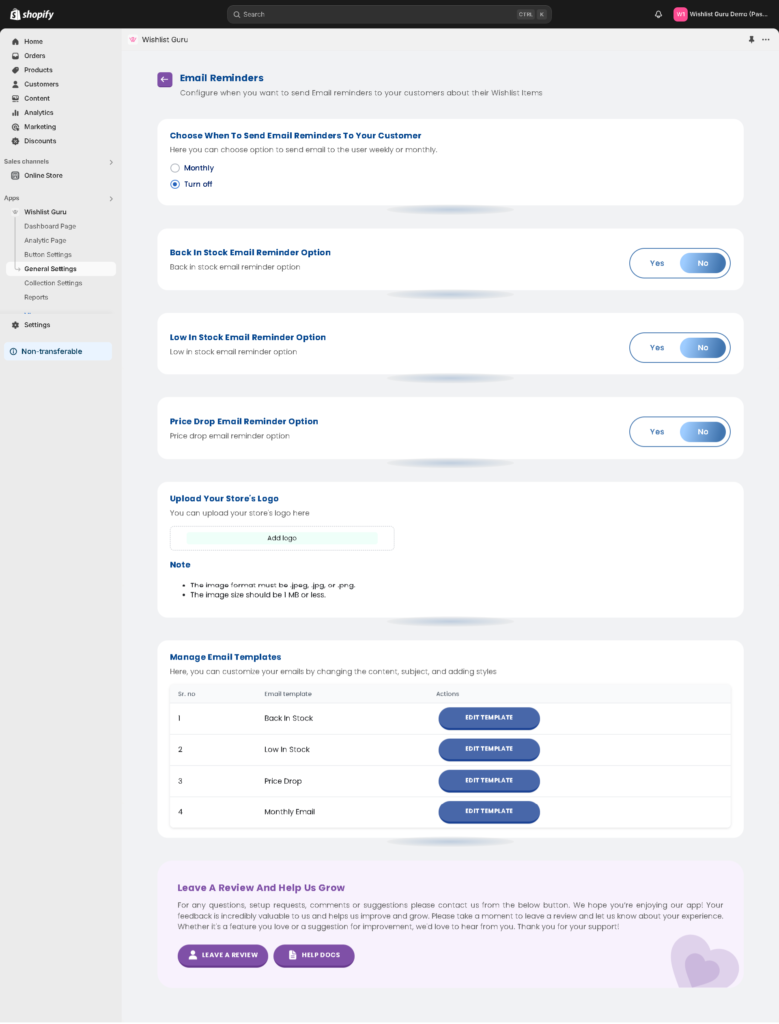
- Go to General Settings
- Click on email reminder settings and
- Enable the Back in stock button as shown in the screenshot.
- By default its “no”
- To enable it, click “yes”
How to set up the Email Flow in Klaviyo: #
If you integrate Klaviyo, then our monthly email limit will be revoked. We will pass all events and data to Klaviyo, and you will need to create and set up flows in Klaviyo. There is no restriction from our side on the email count if you use Klaviyo.
Learn how to set up the Klaviyo integration with Wishlist Guru – click to explore.
How to Set Up the Klaviyo Integration with Wishlist Guru
Pro Tip: If you are not seeing Wishlist Guru – Back in stocks in your “your metrics” section this is because klaviyo will not display flow triggers until they have received at least one event.Do this by triggering the event yourself. Try logging in to your store again and add one product to your wishlist to record this event on Klaviyo .


